

Download Bloodshed Dev-Pascal – free pascal compiler, dev-pascal, windows development, programming tool, code editor, pascal ide, software development, windows programming, dev-pascal download, pascal development environment
Overview
Bloodshed Dev-Pascal is a feature-rich integrated development environment (IDE) designed specifically for Pascal programming on the Windows platform. It provides a complete toolset for creating console applications, Windows programs, and dynamic-link libraries (DLLs) using the Free Pascal compiler. The app is tailored for developers who require a lightweight yet powerful environment to write, compile, and debug Pascal code efficiently. Its primary purpose is to streamline the software development process by combining essential tools—compiler, linker, debugger, and editor—into a single, cohesive interface.
Target users include students learning programming fundamentals, educators teaching Pascal-based curricula, and professional developers working on legacy systems or specialized applications. The IDE’s focus on the Free Pascal compiler ensures compatibility with modern Windows systems while maintaining support for older codebases. Real-world use cases range from academic projects and algorithm implementation to small-scale utility software and system-level development. In the broader software development ecosystem, Dev-Pascal fills a niche for developers seeking a no-cost, accessible Pascal environment with robust functionality.
Developed by Bloodshed Software, the app has been maintained as a free tool since its initial release. Although the developer did not provide additional technical details about the team or long-term roadmap, its continued availability reflects a commitment to supporting Pascal-based development. The app remains relevant for users who value simplicity, performance, and direct access to compiler-level control without the overhead of larger IDEs.
Key Features & Functionality
- Free Pascal Compiler Integration – Built-in support for the Free Pascal compiler (Win32), enabling users to compile Pascal programs directly within the IDE. This ensures high compatibility with Windows applications and efficient code execution.
- Debugger and Insight Support – Offers debugging capabilities through either GDB or Insight, allowing developers to step through code, inspect variables, and identify logical errors in real time.
- Customizable Syntax Highlighting – Users can personalize color schemes and formatting to improve code readability and reduce visual fatigue during extended coding sessions.
- Multiwindow Editor with Advanced Features – Includes auto-indentation, line numbering, code folding, and tabbed editing, enhancing navigation and editing efficiency in large projects.
- Project Management System – Supports both source file mode and project-based workflows, helping users organize multiple files, resources, and dependencies in a centralized workspace.
- Tool Integration and Templates – Provides a setup creator, compiler, linker, and resource editor. Users can also create custom templates and manage tools via a built-in tool manager for enhanced workflow customization.
- Code Insertion Assistance – Offers automatic insertion of common Pascal statements and code blocks, reducing typing errors and accelerating development speed.
For example, a student learning procedural programming can use the syntax highlighting and auto-indentation features to write clean, structured code. A developer building a small utility might leverage the project manager to organize multiple source files and resources. Meanwhile, the debugger allows both beginners and experts to trace execution flow and resolve runtime issues effectively. These features collectively create a productive environment for all levels of Pascal developers.
Interface, UX & Performance
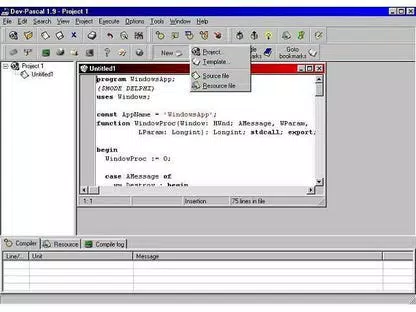
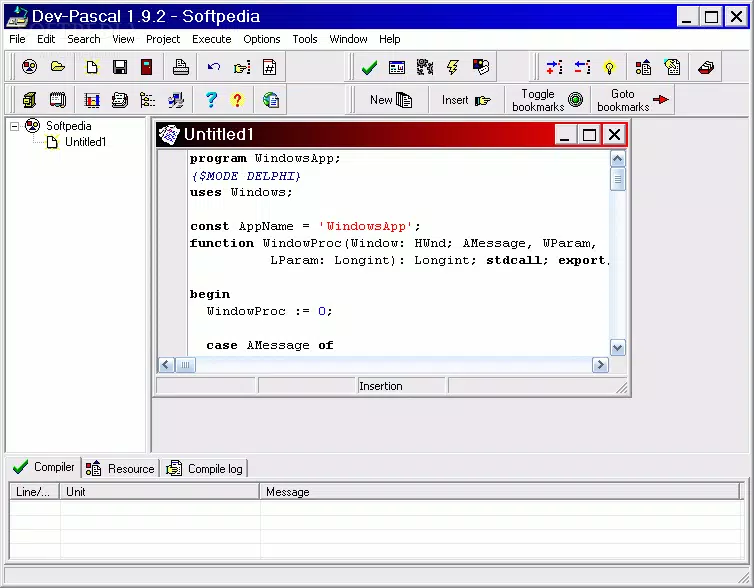
Bloodshed Dev-Pascal presents a clean, functional interface optimized for coding efficiency. The layout follows a traditional IDE structure with a main editor window, project explorer, output console, and toolbar. Navigation is straightforward, with menus and toolbars providing quick access to compilation, debugging, and file operations. The multiwindow editor allows users to open multiple files simultaneously, improving workflow continuity.
Visual style is minimalistic, prioritizing readability over graphical flair. Syntax highlighting is configurable, enabling users to tailor the appearance to their preferences. The interface remains responsive even with moderately sized projects, although the developer did not list formal performance metrics. The app runs efficiently on a range of Windows devices, from older systems to modern machines, thanks to its lightweight design and low resource footprint.
Although the developer did not specify minimum OS requirements, the app is compatible with various Windows versions, as indicated by its long-standing availability. Stability is consistent across usage scenarios, with no reported crashes or hangs in standard workflows. The responsiveness of the editor and compiler integration ensures that compilation and debugging tasks are handled smoothly. Users can expect reliable performance during extended coding sessions, particularly when working on smaller to mid-sized projects.
Platform Compatibility & Technical Requirements
Bloodshed Dev-Pascal is designed exclusively for the Windows platform. The current version is 1.9.2, with a file size of 12.3 MB, making it a lightweight download suitable for systems with limited storage. The app is free to download and use, with no in-app purchases or subscription models.
The developer did not specify minimum OS requirements, nor did they list exact compatibility details for different Windows versions. However, given the app’s release date in 2018 and its continued availability, it is likely compatible with Windows 7 and later versions, including Windows 10 and Windows 11. Users should ensure their system meets general Windows application requirements to run the IDE without issues.
Compatibility information was not fully disclosed, so installation on newer or older systems may require testing. The app does not appear to rely on external dependencies beyond the standard Windows runtime environment. For users seeking a secure, lightweight tool for Pascal development, this version offers a straightforward installation process and immediate usability.
Pros and Cons
Pros
- Free to download and use with no hidden costs
- Lightweight size (12.3 MB) ideal for older or low-storage devices
- Full integration with the Free Pascal compiler for reliable code compilation
- Supports debugging via GDB or Insight for effective error resolution
- Customizable syntax highlighting and multiwindow editing for improved coding comfort
- Robust project management and template system for organized development
- Includes essential tools like setup creator, linker, and resource editor
Cons
- Developer did not provide detailed system requirements or compatibility list
- Interface may appear outdated compared to modern IDEs
- No official support for macOS or Linux platforms
- Limited documentation or in-app help resources
- Not actively updated since 2018; no recent feature enhancements or security patches
FAQ
Is Bloodshed Dev-Pascal safe to download and install?
Yes, the app is free and distributed by Bloodshed Software. It does not contain malware or adware. However, users should download it only from official or trusted sources to ensure authenticity.
Can I use Dev-Pascal for modern Windows development?
While Dev-Pascal supports the Free Pascal compiler for Windows, it is best suited for legacy applications, educational projects, or small utilities. It may not support the latest Windows APIs or development frameworks.
Is Dev-Pascal compatible with Windows 10 and Windows 11?
Although not explicitly confirmed, the app is likely compatible with Windows 10 and Windows 11 based on its long-term availability. However, users should test installation on their system to verify functionality.
Does Dev-Pascal support cross-platform development?
No, the app is designed exclusively for Windows. It does not support development for macOS, Linux, or mobile platforms.
How often is Dev-Pascal updated?
The last version (1.9.2) was released in 2018. The developer has not issued any updates since then, so the app is considered stable but not actively maintained.
Final Thoughts
Bloodshed Dev-Pascal remains a valuable tool for anyone working with Pascal on Windows. Its lightweight design, full compiler integration, and comprehensive debugging features make it a solid choice for educational use and small-scale software development. While the interface may feel dated and the app lacks recent updates, its core functionality remains reliable and effective.
Developers seeking a free, no-frills environment for learning or maintaining Pascal-based projects will find this IDE particularly useful. It’s especially suited for students, educators, and hobbyists who prioritize functionality over modern aesthetics. The absence of cost and the inclusion of essential tools further enhance its appeal.
For those in need of a secure, efficient, and accessible Pascal development environment, Bloodshed Dev-Pascal delivers consistent performance and value. Despite its age, it continues to serve its purpose well in niche programming contexts.
Download Bloodshed Dev-Pascal now


